How to Issue a Recibo Verde (Emitir Recibo Verde) in English, 2026
Exact walkthrough of issuing recibos verdes electronically at Portal das Finanças. Retention rules, VAT fields, and how to invoice non-PT clients.
Contents
Once your freelance activity is open at Portal das Finanças, every payment from a client requires you to issue (emitir) a recibo verde electrónico: literally a “green receipt”, though they’re now electronic and white. This guide walks through the exact steps for the most common scenarios - PT business clients, individual PT clients, and non-EU clients.
See your own number. Enter your income and get your 2026 tax and take-home pay on recibos verdes, in under a minute.When to issue what
| Situation | Document type |
|---|---|
| Client pays immediately on invoice (most common) | Fatura-recibo |
| You invoice now, client pays later | Fatura first, then Recibo when paid |
| Refunding a client | Nota de crédito |
| Client never pays | Cancel the fatura (until that year’s IRS deadline) |
For 95% of expat freelancers - IT consultants, designers, doctors with private clients - the fatura-recibo is the right pick.
The walkthrough
Log in at Portal das Finanças ↗
Same login as for any other AT action: NIF + password. Make sure you’re logged in as the cidadão profile (not as a separate company entity).
Navigate to 'Recibos Verdes Electrónicos'
Search “Recibos Verdes” in the top search bar, or navigate via:
Cidadãos → Os seus serviços → Atividade → Recibos verdes electrónicos
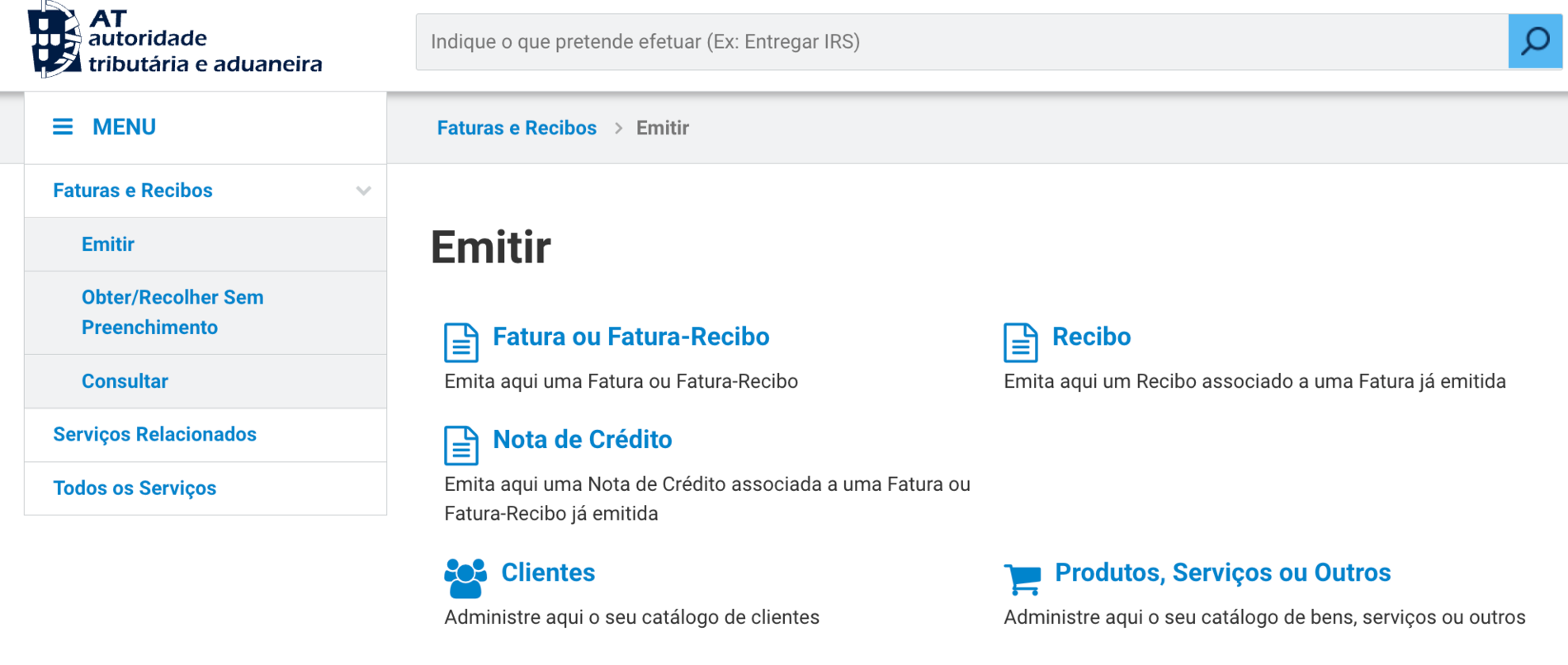
Click “Emitir” to start a new fatura-recibo.
Choose document type: Fatura-Recibo
AT presents three options:
- Fatura (invoice only - client will pay later)
- Fatura-Recibo (invoice + payment receipt combined)
- Recibo (payment receipt only, after a previously issued fatura)
Pick Fatura-Recibo for the standard “client just paid you” case. The other two are for split-document workflows.
Fill the client information
-
Tipo de adquirente: Select whether your client is:
- “Sujeito Passivo” - a PT business with a NIF
- “Particular” - an individual (PT or international)
- “Não residentes” - a non-PT entity or person
-
NIF: Enter the client’s NIF (if PT) or VAT number (if EU) or leave blank with “Particular não identificado” if a small individual sale.
-
Designação: Client name (full company name or full personal name). Must match the NIF holder’s registered name.
-
País: Country of the client.
Atividade › Recibos verdes › Emitir Fatura-Recibo
Identificação do adquirente
Tipo de adquirente
Sujeito passivo (PT) ▾
NIF / VAT number
509 123 456
Nome / Designação
Empresa Cliente Lda.
País
Portugal ▾
Schematic - actual UI may differ. Illustrates layout, not exact pixels.
Add the service line(s)
-
Designação dos bens ou serviços: Brief description of the work. Be specific enough that AT can identify the activity (e.g. “Software development consulting - January 2026” not just “consulting”).
-
Valor base: The amount before any VAT. If your client pays €1,230 total and you’re VAT-registered at 23%, the valor base is €1,000.
-
Taxa de IVA: VAT rate, if applicable.
- Isento Art. 53 - if you’re below €15k threshold and registered as exempt
- 23% standard rate
- 6% / 13% reduced/intermediate rates (rare for services)
-
Retenção na fonte: Critical - see next step.
Decide on retenção na fonte (withholding)
This is the trickiest field for new freelancers. It’s a prepayment of IRS that the client withholds and pays directly to AT on your behalf.
Three possibilities depending on your situation:
- 23% - Standard rate for the professional activities listed in the artigo 151.º table, whenever the client has organised accounting. Most new freelancers and those with small income.
- 11.5% - Rate for Category B income not listed in the artigo 151.º table (commercial, industrial and agricultural activities). It’s set by your activity, not by your year of activity.
- Sem retenção (0%) - No withholding, available when:
- Your client is a non-resident (no PT NIF)
- Your client is an individual particular (not a business)
- You expect annual Category B income below the €15,000 threshold AND you opt for no retention
Standard retention
23%
Default for PT business clients
Outside the art. 151.º table
11.5%
Set by activity, not by year
No retention (€)
0%
For non-PT or individual clients
Review and emit
AT shows a summary with the calculated total. Verify:
- Client NIF is correct (you can’t edit after emission)
- VAT rate matches your regime (don’t charge VAT if you’re Article 53 exempt)
- Retention rate is the one you intended
- Description is specific enough
Click “Emitir”. The document is issued immediately and gets a unique number. Send the PDF to your client (AT generates it).
Atividade › Recibos verdes › Fatura-Recibo emitida
Fatura-Recibo nº 2026/0042 - emitida com sucesso
Adquirente
Empresa Cliente Lda. (NIF 509 123 456)
Descrição do serviço
Software development consulting - March 2026
Valor base
€1,000.00
IVA (Isento Art. 53)
€0.00
Retenção na fonte (23%)
−€230.00
Total a receber pelo prestador
€770.00
Schematic - actual UI may differ. Illustrates layout, not exact pixels.
Worked example: invoicing a US client
A US-based SaaS company pays you €5,000 for consulting:
- Tipo de adquirente: Não residentes
- NIF: their EIN (e.g. 12-3456789) - or blank if unknown
- País: United States
- Designação: “SaaS architecture consulting - March 2026 sprint”
- Valor base: €5,000
- Taxa de IVA: Isento (services to non-EU are out of EU VAT scope)
- Retenção: 0% (non-resident clients don’t withhold PT IRS)
- Total to client: €5,000
That’s the simplest case - flat amount, no VAT to charge, no retention. The full €5,000 lands in your account.
Worked example: invoicing a PT business
A Lisbon agency pays you €1,000 for design work:
- Tipo de adquirente: Sujeito Passivo
- NIF: their PT NIF
- Designação: “Visual design for [project] - February 2026”
- Valor base: €1,000
- Taxa de IVA: depends on your regime (23% if VAT-registered, isento Art. 53 if exempt)
- Retenção: 23% (€230 withheld and paid directly to AT)
- Net to you: €770 (or €943 if you’re VAT-registered and they pay €1,230 gross with VAT) → AT receives €230 retained
The retention isn’t lost money - it’s a prepayment of your annual IRS. At year-end declaration, you reconcile against your total tax owed; usually the retentions over-cover and you get a refund.
What to do after issuing
- Send the PDF to your client - most clients expect this directly, even though they could fetch from AT
- Track payment - if it’s a fatura-recibo (paid simultaneously), you’re done. If it’s a fatura (paid later), issue a recibo when payment arrives
- Income is auto-reported - AT’s e-Fatura system captures everything and feeds into your Anexo B at IRS time (Modelo 3). You don’t need to log separately
- Track expenses on the buy-side too - see the Cat B deductible expenses guide for what to log on e-Fatura to satisfy the 15% justification rule
- File the quarterly SS declaration - income from these recibos verdes feeds the SS contribution base
Coming up for recibos verdes
- SS quarterly declaration (Jul-Sep 2026) · Recibos verdes (self-employed)
- IVA Q3 declaration (payment by Nov 25) · VAT-registered freelancers and businesses (trimestral regime)
- Last day to contest your 2025 IRS assessment (reclamação graciosa) · Anyone whose 2025 IRS assessment looks wrong or too high
Get a reminder a week before each one.
One short email a week before each deadline on this calendar (Segurança Social quarterly, IVA, IRS, IMI), with the walkthrough for that step, plus a note when the rules change. Usually one to three emails a month; unsubscribe any time.
How do I cancel (anular) a recibo verde I issued by mistake?
You can cancel it on the Portal das Finanças until the annual IRS filing deadline for that year’s income — after that, the option disappears. Go to Serviços → Recibos Verdes → Consultar, open the document with VER, and click Anular. You’ll pick a reason (wrong details, the work never happened, issued by mistake), and the document stays in your list marked in red as “Anulado”.
Three things to know:
- Your client sees it too. If their NIF is on the document, the cancellation flows through to their e-Fatura, and the amount stops counting toward your Anexo B income.
- Cancel, then reissue. There is no “edit” — the correction flow is always cancel the wrong document and issue a fresh, correct one.
- The deadline is real. Once the Modelo 3 deadline for that year has passed, cancellation is closed and fixing it becomes a conversation with AT rather than a button.
If the Anular button does nothing — a known Portal flakiness that different browsers won’t fix — skip the phone line and the Loja do Cidadão queue. Open an e-balcão request instead (Portal das Finanças → Contactos → e-balcão), quoting the document number and attaching a screenshot of the failed attempt. That creates a written record with a response deadline, which is both the channel that actually resolves stuck cancellations and your proof that you tried to regularise it in time.
Common mistakes
Forgetting retention on PT business clients. If you’re below the €15,000 threshold and forget to mark “no retention”, AT still expects the client to have withheld 23%. The discrepancy is sorted at annual settlement, but it confuses everyone.
Wrong VAT regime selection. If you’re Article 53 exempt and accidentally charge 23% VAT, you’ve collected money you have to remit to AT anyway - and your client might dispute the higher amount.
Vague service descriptions. “Consulting” or “services” gets flagged in audits. Be specific: “Software architecture consulting - Q1 2026” or “Photography services - wedding event March 15”.
Issuing too late. Fatura-recibos should be issued within ~5 working days of payment received. Significant delays raise audit flags.
Run the numbers
The TAXCLARA calculator shows what your annual net looks like after IRS (at Portugal’s 2026 income tax rates), retentions, and SS - once you have a sense of what you’ll invoice in a year. Set the year of activity to 1 if you’re newly opened and watch the year-1 benefits apply.
Sources
Try the numbers for your situation
See your freelancer net - IRS, IVA and Segurança Social.
Same engine that powers the examples in this article.
Open calculator →Stay ahead of the quarterly SS + IRS deadlines.
Once you're issuing recibos verdes, quarterly Segurança Social declarations and the annual IRS filing kick in. Get a plain-English email before each deadline. No drip campaign.
Spotted a mistake or something unclear? Tell me what to fix or add on this page. I read every note. Suggest an edit
Thank you — got it.
I'll check it against the official sources and update the page if needed.
Related guides
-
freelancer
How to File Your Quarterly IVA Return in Portugal (Q2 Due 21 Sep)
Every quarterly IVA date for 2026, why Q2 is due in September not August, which Quadro 06 fields a freelancer touches (with a worked example), the Portal pre-fill, and what late filing costs.
-
freelancer
Sick Leave, Pregnancy and Unemployment on Recibos Verdes (2026)
The freelancer safety net in Portugal, from the official Segurança Social rules: sick pay from day 11, pregnancy-risk leave at 100%, parental leave, and the narrow unemployment test most freelancers fail.
-
freelancer
What the Portuguese Tax Office Already Knows About Your Income
The honest map of AT's visibility into your money - what banks report automatically, what needs a formal inquiry, whether MB Way is watched, and what actually triggers a problem.