How to Categorize e-Fatura Receipts in Portugal (2026)
How to use Portal e-Fatura to maximize your IRS refund. Why receipts auto-categorize wrong, how to fix them, and the February deadline that locks the categorization.
Contents
Every time you ask for a “fatura com NIF” at a restaurant, doctor, or supermarket, that receipt eventually shows up on Portal e-Fatura. The system auto-assigns it to a category - health, education, general expenses, etc. - and that category determines what deduction à coleta you can claim at IRS time.
Problem: roughly 10-15% of receipts land in the wrong category. If you don’t reclassify them before the February 25 deadline, you’re stuck with the wrong rate and may lose €100-€500 in deductions per year.
This guide walks through using e-Fatura to maximize what you get back. (For the underlying VAT receipts mechanism - exigência de fatura, the €250 cap, the 100%-of-VAT transport quirk - see that companion guide.)
Average impact of correct categorization
€200-€500/year
Why receipts get miscategorized
When a merchant issues you a fatura with NIF, their CAE code (the activity classification of their business) determines the default category your receipt gets assigned to. This works well most of the time - a doctor’s CAE → health category - but breaks when:
- Pharmacies sell both medication AND non-medical items (cosmetics, food). Auto-categorization picks one default for the whole shop.
- Supermarkets sell food AND household goods AND some pharmacy items. Default is “general expenses” but health items in there should go to health.
- Independent gyms sometimes have a CAE that doesn’t trigger the sports category - they get logged as general.
- Tutoring services without an education-specific CAE land in “general”.
- Veterinary services correctly go to vet category but cross with general at chain pet stores.
For each receipt, you have until February 25 of the year following to fix it. After that, AT locks the categorization for the previous tax year.
The walkthrough
Log in at faturas.portaldasfinancas.gov.pt ↗
Direct link: faturas.portaldasfinancas.gov.pt
This is a different domain from the main Portal das Finanças but uses the same NIF + senha credentials.
Mobile: there’s also an official e-Fatura app for iOS and Android, same login. Useful for catching receipts on the go.
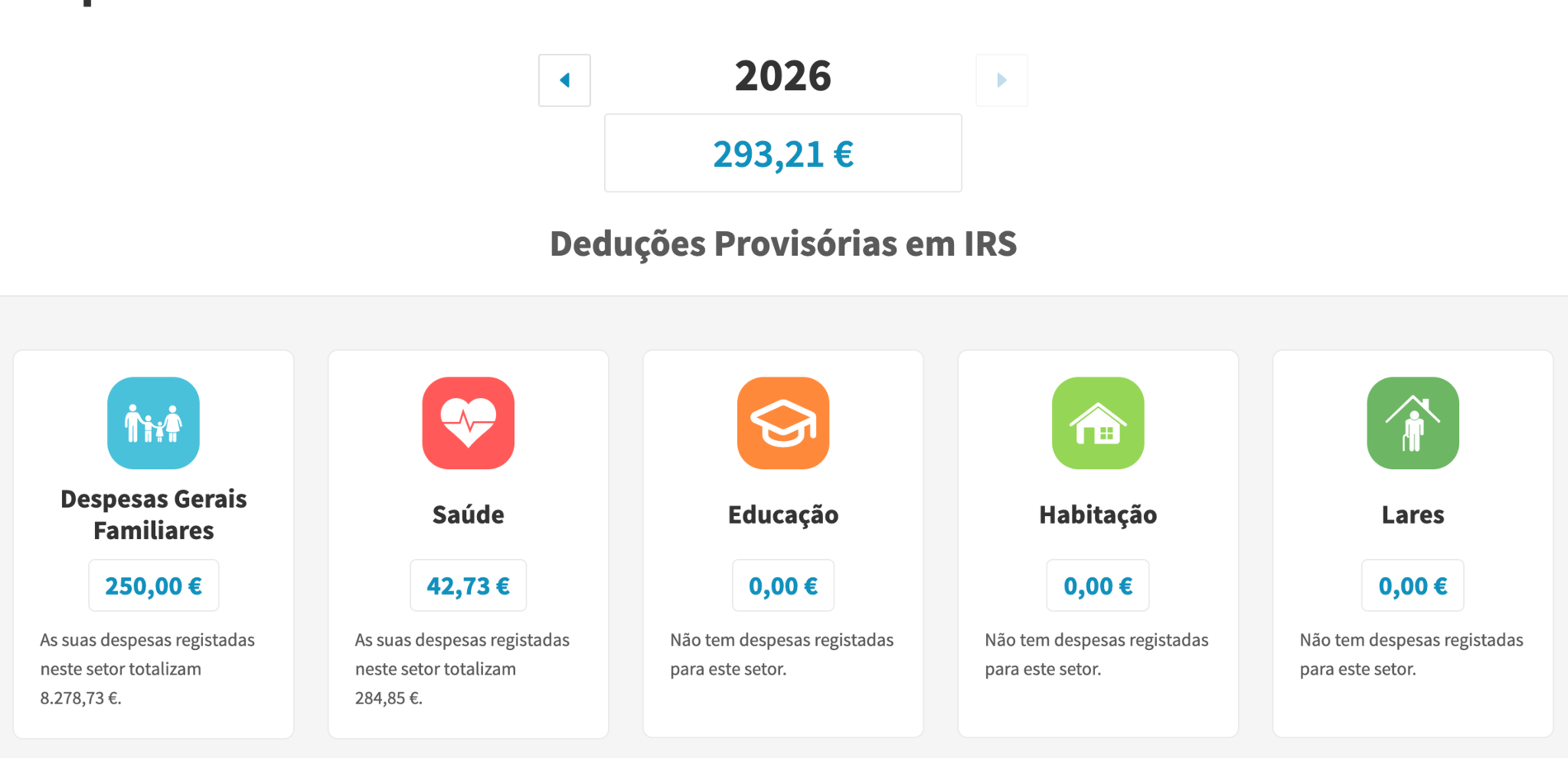
Filter to 'Pendentes' (pending) receipts
Pendentes are receipts that auto-categorized but need your confirmation. They show up because:
- The merchant’s CAE code maps to multiple categories
- The receipt amount is unusual for their category
- You’ve recently disputed similar categorizations
Click “Verificar Faturas” or filter by status: Pendentes.
Categorize each pending receipt
For each pending receipt, you’ll see:
- Merchant name + CAE code
- Amount
- Date
- Default suggested category
Choose the correct category from the dropdown:
| Category | What goes here |
|---|---|
| Saúde | Doctor / dentist visits, prescription medication, eyewear, health insurance premiums, hospital fees |
| Educação | Tuition (private schools or universities), school books, after-school courses if certified, professional training |
| Habitação | Primary-residence rent, pre-2012 mortgage interest |
| Lares | Care home / assisted living for elderly or disabled relatives |
| Despesas gerais familiares | Supermarket, household goods, clothing, personal care items |
| Restauração e alojamento | Restaurants, bars, hotels (15% of VAT credited) |
| Cabeleireiros, manutenção e reparação de veículos automóveis | Hair salons, vehicle repairs (15% of VAT credited) |
| Atividades veterinárias | Vet services (15% of VAT credited) |
| Atividades desportivas / ginásios | Gyms, sports clubs (30% of VAT credited) |
| Transportes públicos coletivos | Transport passes, train tickets (100% of VAT credited) |
| Cultural (NEW 2026) | Books, theatre tickets, museum entries (15% of VAT) |
Click “Confirmar” to save your choice.
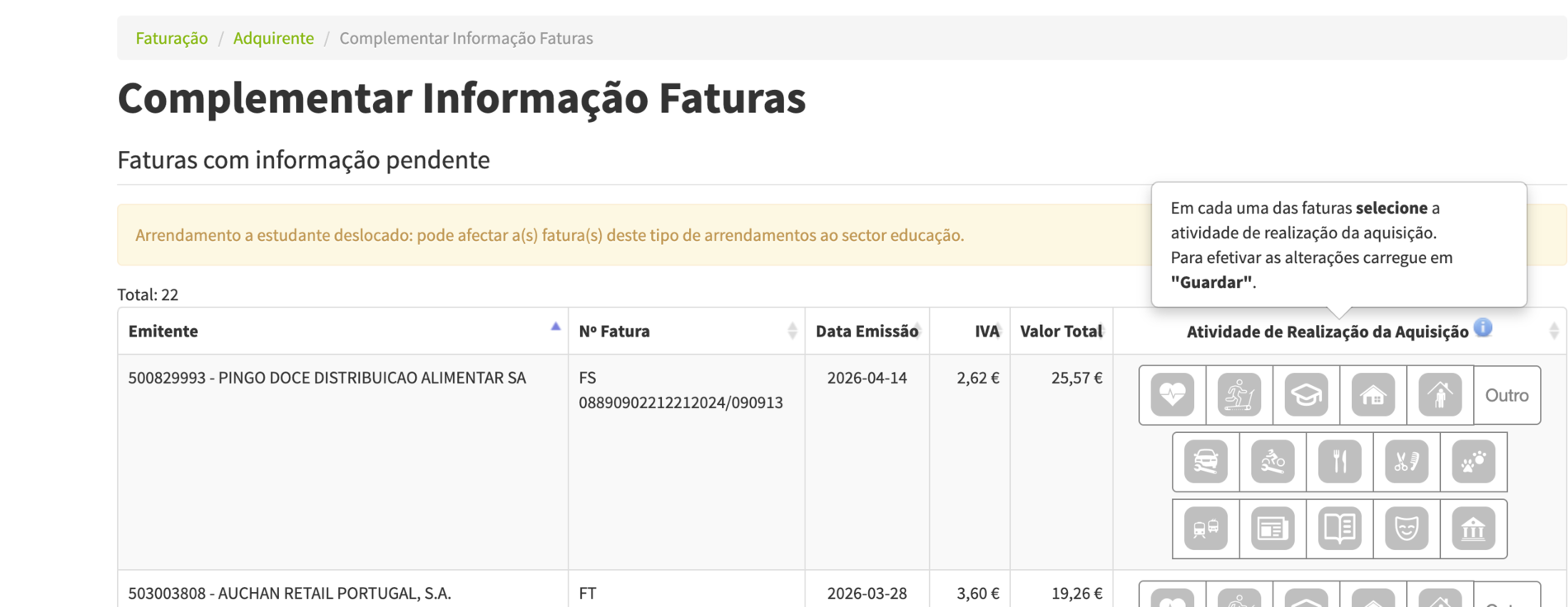
Cross-check 'Despesas Gerais' for misplaced items
This is where most people leave money on the table. Receipts with generic descriptions (“compra fatura”) often default to general expenses but should be elsewhere.
Filter to “Despesas gerais familiares” and review the list. Look for:
- Pharmacy receipts - should usually be Health (15% rate, €1k cap is much higher than general’s 35% / €250 cap for high-spend items)
- Schoolbook purchases - should be Education (30% rate, €800 cap)
- Online courses with NIF - usually Education
- Sports class bookings - should be Atividades desportivas
Reclassify each one. The rate often shifts in your favor (15%-30% rates beat the 35% but small €250 cap of general expenses for high-spend categories).
Verify Atividade Profissional (for freelancers)
If you have Cat B activity, e-Fatura has a separate section for business expenses. These receipts feed into your Anexo B Quadro 17 for the 15% justification rule.
Filter to Atividade Profissional → Despesas pendentes. For each business expense, confirm:
- Mark “Atividade profissional” (yes, this was for business)
- Pick the appropriate sub-category (rent, utilities, transport, etc.)
Receipts you’ve confirmed as business expenses won’t double-count on the personal IRS side. AT handles the split correctly.
See Cat B deductible expenses guide for what counts.
Add missing receipts manually
Sometimes a merchant doesn’t report a fatura you received (their filing was late, glitched, or they’re not properly registered).
For these:
- Click “Adicionar fatura”
- Enter merchant NIF, fatura number, date, amount, category
- Upload the PDF or photo of the receipt
AT cross-checks: if the merchant later files their copy, the system reconciles. If they never file, your manual entry might trigger scrutiny - only do this for receipts you can document with the original PDF.
Monthly habit
Set a recurring 15-minute window monthly. Steps:
Frequency
Monthly
1st-5th of next month
Time per session
15 min
If you have ~30 receipts/month
Annual upside
€200-500
vs leaving auto-categorization
The earlier you do it, the easier - receipts are top-of-mind and you remember the context (which dinner was business, which was personal).
Important deadlines
| Date | What |
|---|---|
| Within 30 days of fatura | You can reclassify any single receipt |
| February 25 | Final deadline to lock all categorizations for previous tax year |
| April 1 | IRS declaration window opens; all e-Fatura data is now read-only |
| June 30 | IRS declaration deadline |
If you miss February 25 for a previous year, you can still file IRS but the auto-pulled deduction amounts use whatever (possibly wrong) categories were active at lockout.
What to do if a merchant didn’t issue a fatura
You spent €200 at a doctor but they only gave you a generic receipt without NIF - common in casual situations.
Options:
- Within 5 days: ask them to issue a fatura with your NIF retroactively. Most professionals can do this.
- After 5 days: ask if they’ll issue a manual fatura. Some will, some won’t.
- Last resort: log the expense as a manual entry on e-Fatura with whatever documentation you have. AT may or may not accept it without merchant confirmation.
Lesson: always ask “fatura com NIF” at the moment of payment. After-the-fact requests fail half the time.
What gets you flagged
AT cross-references e-Fatura with merchant filings. Things that trigger review:
- Manual entries that don’t match merchant submissions
- Reclassifying many receipts in patterns that look optimized (e.g., everything moved from general to higher-rate categories on the same day right before deadline)
- Sudden surge in any category compared to past years without explanation
Reclassifying mistakes is fine and expected. Wholesale gaming triggers audits.
Apps and tools that help
- e-Fatura mobile app (official AT) - scan receipt QR codes; auto-fills
- Doutor Finanças app - shows your potential refund updated as receipts come in
- Banking apps with PT integration - Revolut PT, ActivoBank - log NIF receipts automatically when you pay by card
Run the math
The TAXCLARA calculator’s deductions panel lets you plug in annual category totals and see exactly what each one contributes to your refund. If you’ve never categorized e-Fatura, plug in your auto-totals first; then plug in optimized totals; the delta is what you’d get back.
To see what last year’s receipts actually got you, drop the Demonstração de Liquidação into the IRS check. It lists each deduction the AT applied against what it could have been.
Sources
Check your own return
See your IRS recalculated line by line, in English.
Drop your Demonstração de Liquidação and Modelo 3, or type in your numbers before you file. You see the deductions that didn't count, joint against separate, and what's due next. It runs in your browser; nothing is uploaded.
Open the IRS check →A heads-up before the IRS dates that matter.
Household changes by 15 February, e-Fatura by 25 February, the Modelo 3 window from 1 April to 30 June. One plain-English email before each. No drip campaign.
Spotted a mistake or something unclear? Tell me what to fix or add on this page. I read every note. Suggest an edit
Thank you — got it.
I'll check it against the official sources and update the page if needed.
Related guides
-
deductions
Recibos Verdes: What Expenses Can You Deduct? (PT 2026)
What business expenses count for Portuguese freelancers in simplified regime - what fits the 15% justification rule, how to log them, what AT challenges.
-
deductions
Portugal IRS Deductions 2026: Limits, Caps & Examples
Every category of deduções à coleta in 2026 - health, education, housing, general expenses, VAT receipts. With the global cap formula and worked examples.
-
deductions
VAT Receipts in Portugal: Get Up to €250 Back on Your IRS
Portugal credits part of the VAT you pay on certain services back against IRS - up to €250/year. Which categories qualify, the rates, and how to maximize the rebate.